
increasing usability by turning an excel sheet into an app
A coaching practice needed a purpose-built emotion tracker. I designed it, then built it.
Emotions Paradox is a coaching practice that helps clients examine the stories driving their emotional patterns. When I came on as a consulting designer, clients were tracking emotions in an Excel spreadsheet — not because it was good, but because no existing app fit the methodology.
I proposed something different: with AI-assisted development, I could design and ship a native mobile app myself. A few months later it was live in iOS TestFlight and Android beta, supporting real clients in an active coaching program.
Timeline
· Design: May – June 2026
(alongside broader consulting work)
· Development: July 1 – July 23, 2026
Role
Solo Product Designer & Developer
Partners
CEO
Claude
Cursor
the background.
General mood-logging apps don't support layered, structured entries. The workaround — a shared Excel spreadsheet — created friction for clients and limited insight for coaches. With a paid beta cohort starting, they needed a real tool.
There was no engineering budget, and a workable solution was considered too costly until I proposed designing and building it myself using AI-assisted development, scoped tightly enough to ship before the cohort started.
foundations.
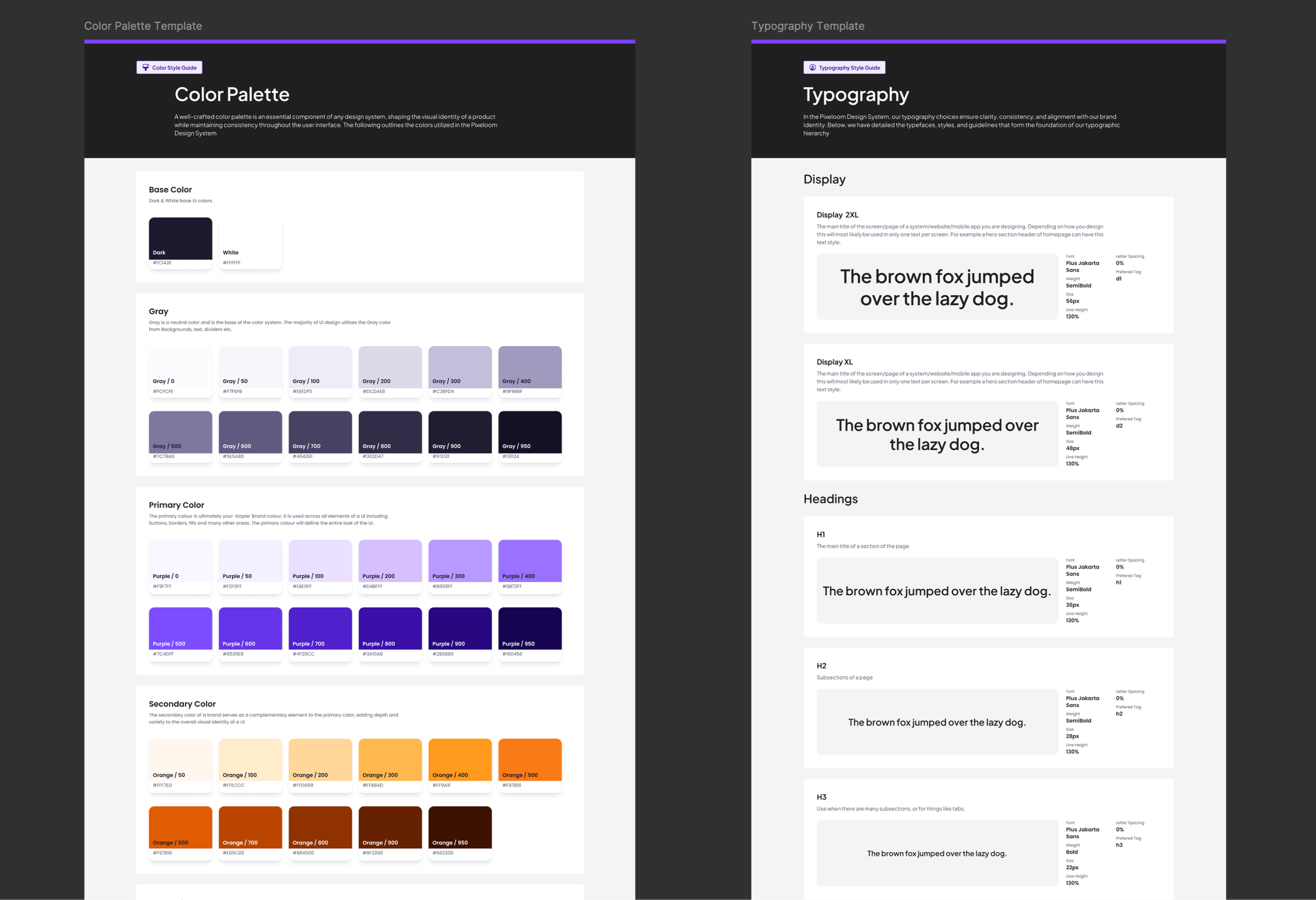
Before designing a single screen, I built a base design system in Figma — color primitives, semantic tokens, typographic scale, Figma variables exported as JSON via Tokens Studio. This meant design decisions could propagate directly to the codebase rather than being re-entered by hand, and gave the app visual coherence from the start.
defining the MVP.
Working with the lead coach, we pressure-tested every feature against one question: does a beta cohort of coached clients need this to get value from their tracking?
In
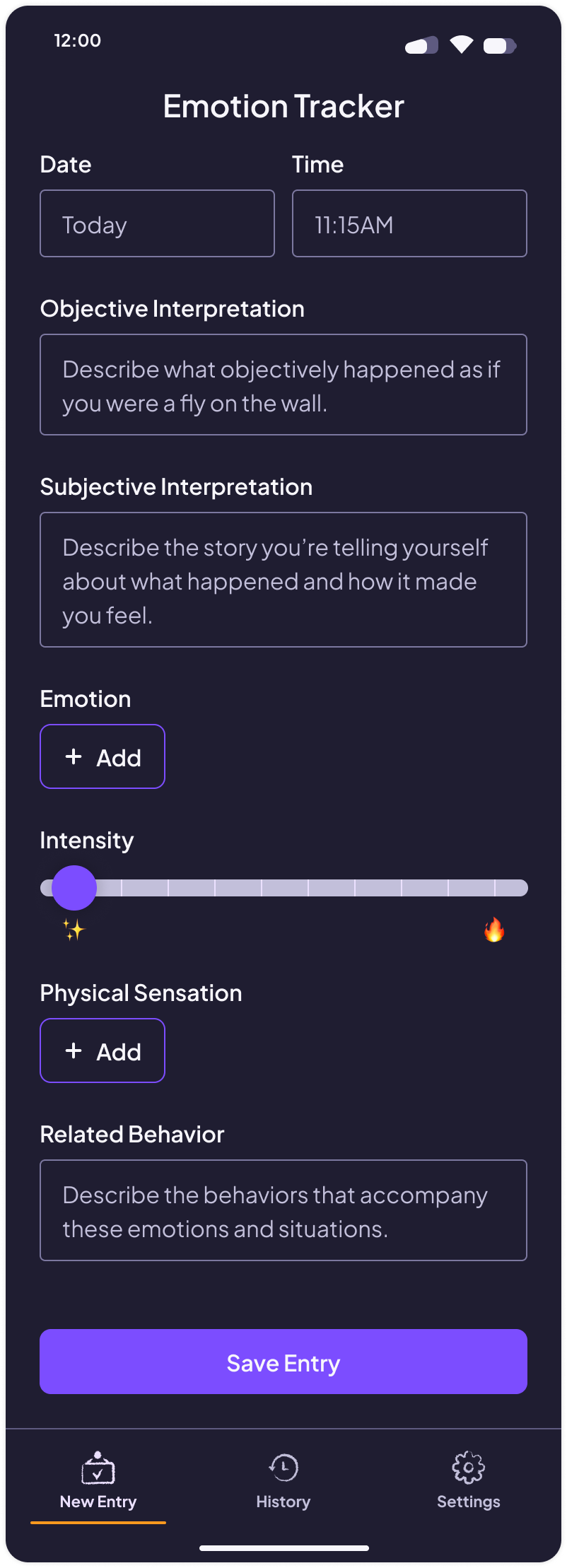
Structured entry flow, emotion picker with layered hierarchy, physical sensations, history with date navigation, invite-only authentication, coach access agreed upon externally.
Deliberately Deferred
In-app toggle for coach access, energy states, synonym-based emotion search, pattern visualization — all valuable, all bigger lifts, none necessary for MVP.
I largely defined the scope, not only as the design expert, but the development expert too.
key design decisions.
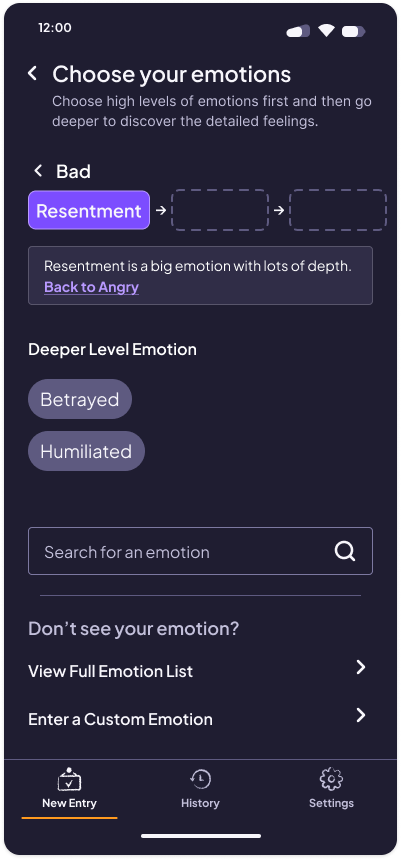
Emotion picker — Good/Bad as the entry point reduces initial decision fatigue. Cross-linking used inline messaging to explain category jumps rather than silently rerouting. Search and custom emotion input available to keep the flexibility and personalization that excel allowed.
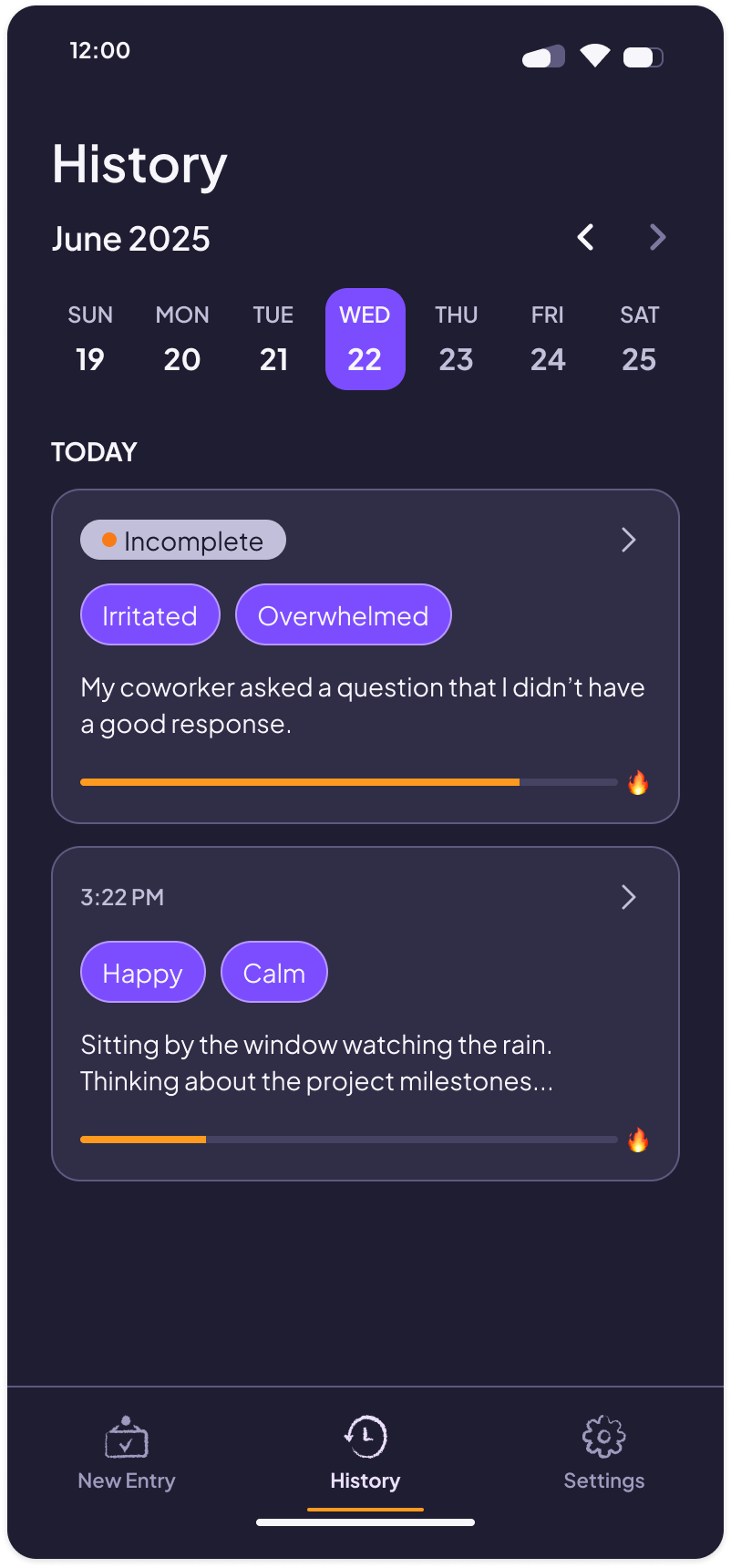
History navigation — A scrollable month strip with forward/back arrows. Given two-to-three week usage, users would never need more than one month back. Show today’s entries on the History landing screen, and specifically call out if users did not enter all fields.
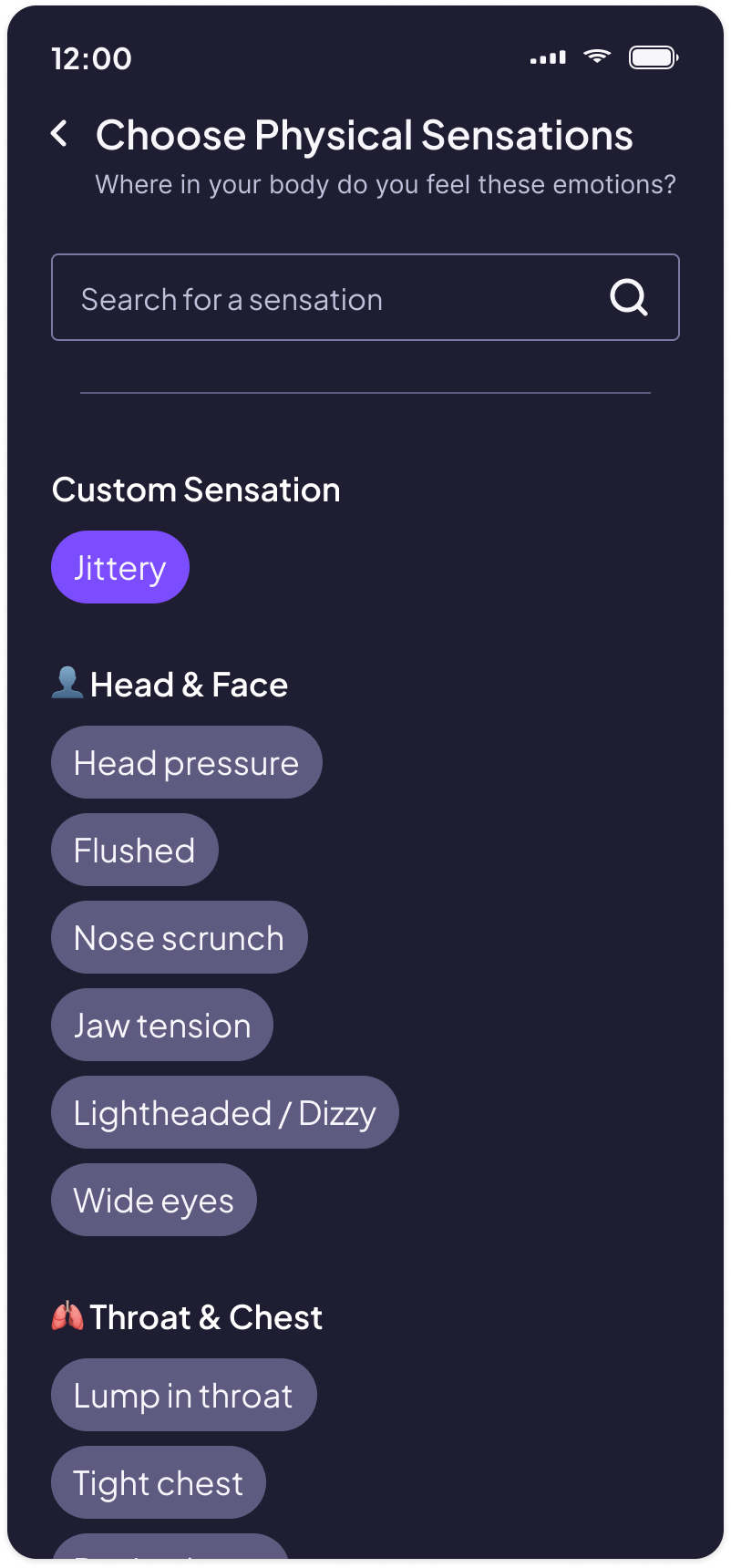
Physical sensations — Initial list was entirely negative, caught in internal review. Added positive sensations, reorganized into categories, removed free-text escape hatch to test whether users navigated the breakdown naturally, and only allow custom entry after search, building now for future scalability and enhancement features, like trend tracking.
testing.
Methodology
Guerrilla testing for functionality with minimum number of users.
Moderated, 30-minute, qualitative interviews using a app generated in Expo Go.
Recommended Updates & Iterations
Clarification on Labels — 100% of users asked clarifying questions about what the labels meant.
Solution: Added “i” info icons with explanations and examples.Microcopy in Emotion Picker — 66% of users called out that the microcopy implied present tense, but you are describing an event that happened (past tense).
Solution: Updated copy, e.g. “How are you feeling?” to “How did this make you feel?”Ability to multi-select emotions — 66% of users tried to pick more than one emotion at first, e.g. Angry & Surprised. When they realized they could not, they chose the deeper/truer emotion eventually.
Solution: Multi-select out of scope for MVP and not necessarily a desired behavior; backlogged for future feature consideration; business is ok forcing users to pick one because that’s also part of the process. Added language about choosing the emotion that resonates the most.
build!
Stack
Expo (React Native)
Supabase
Cursor as AI coding co-pilot
Claude CoWork
EAS Build for distribution
Workflow
Design in Figma
At the Start: Screenshot into Cursor with a prompt → Half Way Through: Link Figma screens into CoWork with descriptions of interaction behaviors, animations, etc.
Generate React Native code
Iterative in Expo Go
After moving between Claude and Cursor to refine prompts and ensure consistency with design, I started using CoWork integrated with a Figma plug in to build directly off my designs, and ended up only using Cursor as a terminal. In the future I would just use CoWork and VS Code.
outcomes + learnings.
Live in iOS TestFlight and Android beta, supporting real clients. Invite-only — coaches create accounts, clients receive credentials. The Excel spreadsheet is retired.
Scope is a design skill. One of the most valuable things I did was identifying which screens didn't need to exist yet, so we could get this out as fast as possible.
AI is a capable co-pilot, but it won’t manage your process. It will build what you describe faithfully. It won't tell you what you forgot to describe, or flag when something you haven't built yet is required before your next step. Even when you explicitly ask it to do that. Keeping track of requirements is still in your own hands.
Foundations before Features. While building a design system and component library could have felt like overhead as a solo designer on a rapid build project, it saved a lot of time, and ensured consistency in the build, especially with a direct Claude–Figma connection.
Next Steps
Coming to an App Store near you.
Get feedback from real users.
Add backlogged features as time allows.
Build a companion product for the coach view (currently a CSV of the raw data), ideally with AI integrated themes, patterns, and recommendations.
Skills
Solo Product Ownership
Design Systems
React Native / Expo
AI-Assisted Development
MVP Scoping · Supabase
Figma Variables & Tokens
Mobile-First UX
tl;dr.
🗂️ Real problem: Clients tracking emotions in Excel because nothing else fit the methodology.
⚡ Solo delivery: Designed and built a native iOS/Android app in under 3 months, part-time.
🧱 Systems-first: Figma design system with token export before touching screens.
✂️ Ruthless scoping: Deferred everything that didn't serve a two-week first use.
📲 Shipped: Live in TestFlight and Android beta, supporting an active cohort.